Recurring Events
Recurring commitments with a priority that shows on the calendar as a real block — not a ghost event you can ignore.
Deep work, exercise, lunch, school pickup. Recurring commitments that matter get displaced when nothing defends them. Set a recurrence pattern and priority, and every occurrence appears on your calendar as a real block. Edit one occurrence or the whole series.
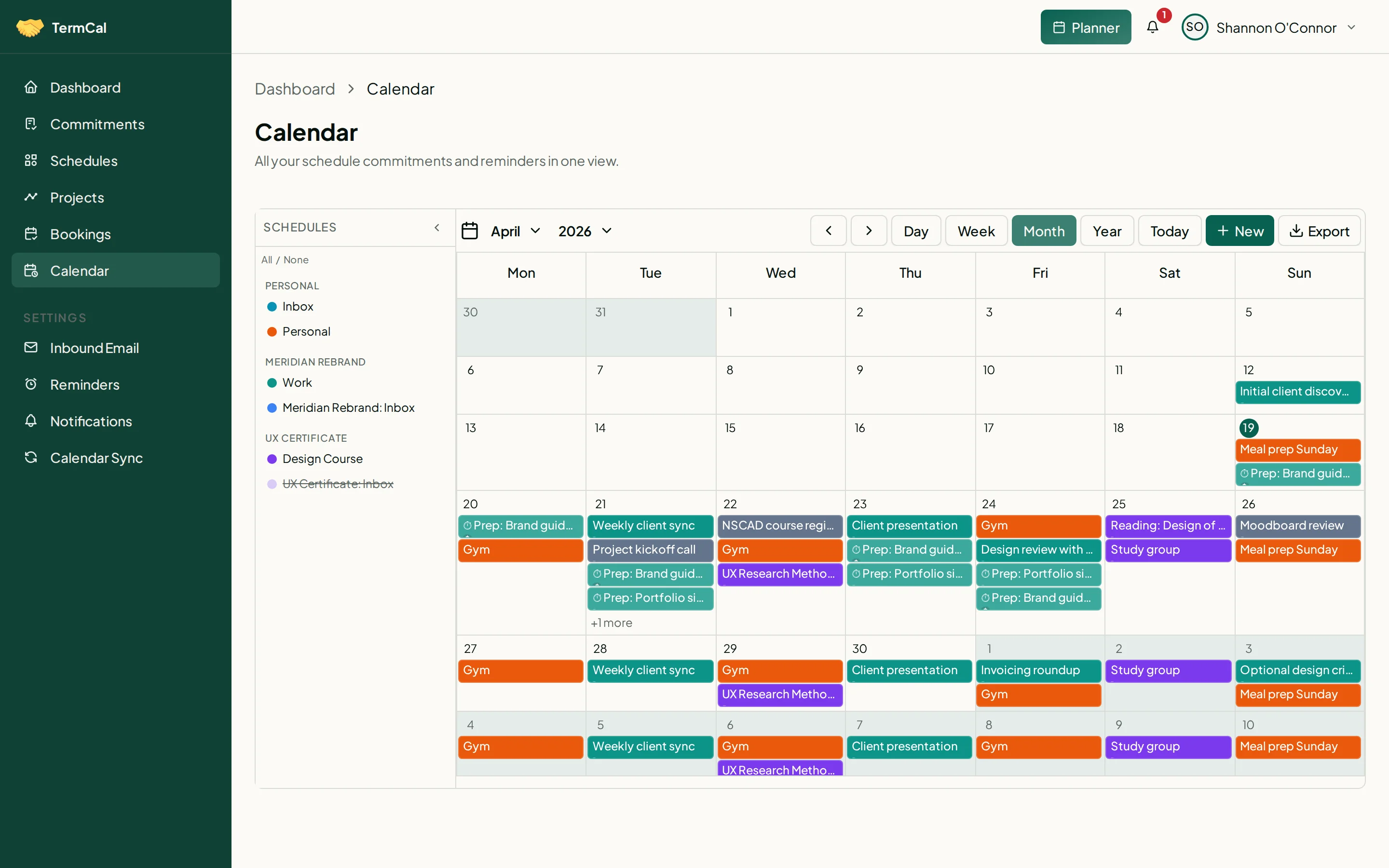
Recurring events appear as real calendar blocks with visible priority.
Priority visible on every occurrence
Each recurring event carries a priority level — low, normal, high, or critical. Priority is displayed on the calendar block so you can see at a glance which commitments matter most when conflicts arise.
Flexible recurrence patterns
Daily, weekday-only, specific days, weekly, monthly. Recurring events support any recurrence pattern. Each occurrence is a real commitment on your calendar, not a background rule.
Syncs to every calendar
Recurring events sync to Google Calendar, Outlook, and any CalDAV-compatible app. The recurrence pattern is preserved natively. Or subscribe via the read-only ICS feed — no account connection required.
Flexible editing scopes
Edit a single occurrence, this and all following, or the entire series. Skip an occurrence without deleting the pattern. Each scope is explicit — you always know what you are changing.