Prep Time
A deadline without allocated hours is a plan to work evenings and weekends.
Set a prep budget on any commitment with a deadline. TermCal distributes work sessions across your available hours, working backward from the due date. You decide how many hours the work is worth; the system finds the slots and creates prep sessions that fill the gaps.
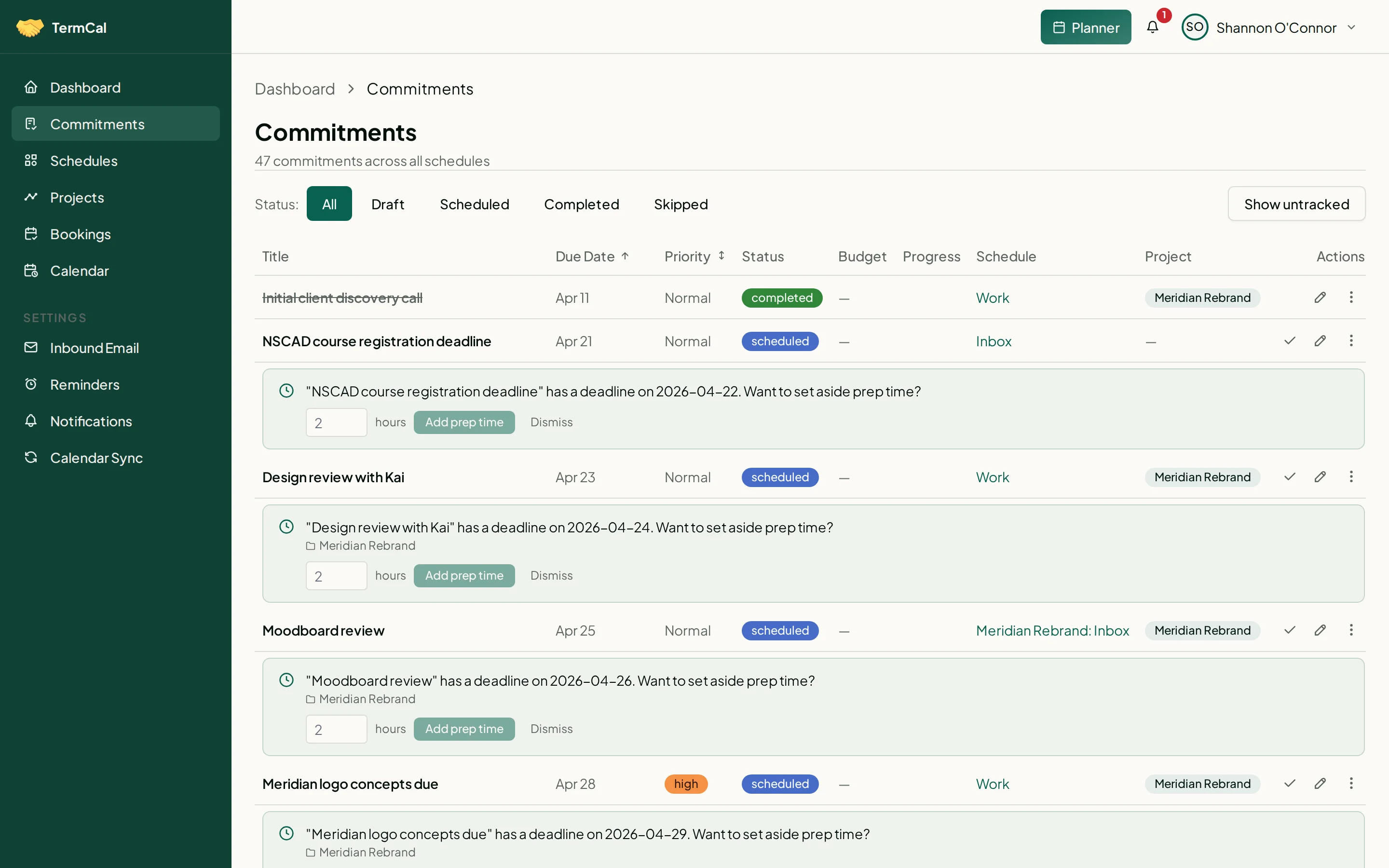
Set a prep budget and TermCal distributes work sessions before the deadline.
Budgeting, not estimating
A prep budget is how many hours a commitment is worth, not how long it will take. This is a deliberate allocation: a prioritisation decision that makes the trade-off between competing commitments concrete.
Work sessions scheduled backwards from the deadline
TermCal fills your available slots with work sessions, working backward from the due date. Each session is linked to the parent commitment. You set the budget; the system distributes the work.
Configurable session length
Set a maximum session length (e.g. 2 hours) in your account settings. No work session will exceed it. Sessions are placed in genuinely available gaps between your other commitments.
Visible on the calendar
Work sessions appear as calendar blocks linked to the parent commitment. Drag to reschedule manually. The prep budget is preserved — the total hours stay allocated even if individual sessions move.